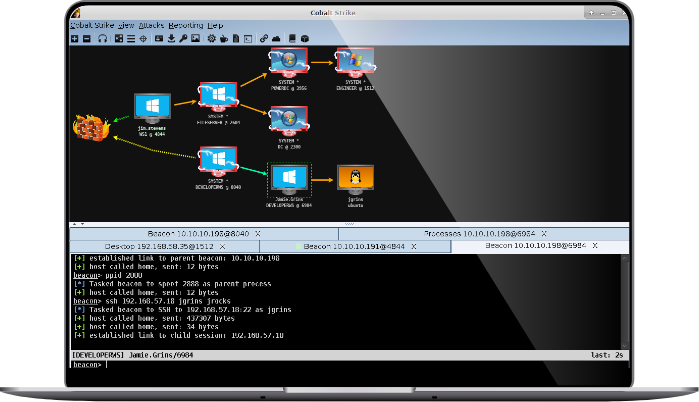
This is just a friendly note to say that Cobalt Strike 05.08.13 is now available. This update is mostly bug fixes and performance improvements. I have a very exciting feature in the works, but I’d like to give it another development cycle before I push it to production.
March and April are the busy season for me. I’m on the road traveling to various exercises, testing out my wares. Starting this weekend, I will play red in three exercises back-to-back. One advantage to playing in all of these exercises is that I’m able to leverage my experiences and feedback from my fellow red team members to improve Armitage and Cobalt Strike.
Here are a few of the exercise-inspired changes that made it into this release:
The VNC Viewer in Cobalt Strike now starts out view only. Untoggle the spy button to take control of the user’s desktop. — I’m having a lot of fun with VNC at these various exercises, but unfortunately I keep giving myself away by accidentally moving a student’s mouse. This change will ensure that I’m only moving a cursor when I want to.
Added a spawnto command to Beacon. This command forces Beacon to use the specified program to spawn shellcode into. — Pro-tip for RAT Developers: if you inject shellcode into the current process, you risk losing your access if the shellcode crashes the process. To get around this, Beacon spawns shellcode into a notepad.exe instance. I use notepad.exe because its location is reliable. Unfortunately, the world is getting wise to dirty hacker tricks, such as connecting to the internet from notepad.exe. With this change, you can have Beacon spawn shellcode into something else on the user’s system (e.g., Internet Explorer).
The event log now shows the date next to the time associated with each message. Cobalt Strike also highlights messages that mention your nickname.
After Western Regional CCDC, I tried to generate a report from the four team servers I was connected to. The merged report wasn’t up to my standards. Most fields weren’t sorted, credentials weren’t merged across servers, and several other details were out of whack. Instead of one report, I generated four (one from each server) and used the reports to give students feedback. For this update, I went through the various data merging issues and corrected them. Next event, it’s my hope to generate one report that tells the full story.
This update focuses on Cobalt Strike’s Beacon agent again. At NECCDC, we had a few situations where Beacon was our only access to a host and Meterpreter would get blocked or cut off quickly. This update adds commands to download a file, upload a file, and execute a program (without cmd.exe) to Beacon. These capabilities help round out Beacon as a remote administration tool.
This update also changes how the [host] -> Meterpreter -> Access -> Dump Hashes -> lsass method menu works. The menu issues a hashdump command through Meterpreter, captures its output, and places it into the database. A common complaint is that this menu item provides no feedback or output. This has changed. Now, this item opens a meterpreter tab, and presents the hashes as they’re dumped and recorded.
This update changes how Cobalt Strike and Beacon exchange information. If you plan to collaborate using Cobalt Strike, make sure all users have the latest version and that the team server is running the latest version of Cobalt Strike.
The 2013 season for the Collegiate Cyber Defense Competition (CCDC) is well underway. These CCDC events put student blue teams in charge of a corporate network. One hour of competition time simulates a week of real life. On top of system administration and business injects, students must defend their networks against a constant barrage of attacks from a professional red team.
In the past, different vendors have made extended trials of their products available for use by the CCDC red teams. In 2012, Rapid7 made Metasploit Pro available. Several years ago, Immunity offered their Canvas product as well. Keeping with this tradition, Strategic Cyber has made Cobalt Strike available to the 2013 red teams.
This offer is more than an extended trial though. I believe a well-prepared red team will help the students get the most out of their CCDC experience. To help CCDC red teams prepare, Strategic Cyber has mailed its pen test lab DVDs to all red team members that requested one. This DVD includes target VMs and self-guided labs on exploitation, social engineering, post-exploitation, pivoting, and collaboration.
Collaboration – While most commercial penetration testing products offer collaboration features now, Cobalt Strike’s little sister Armitage pioneered some of these ideas. Armitage was made to meet CCDC red team needs. With Cobalt Strike, CCDC red teams will have the ability to simultaneously interact with compromised hosts, share data, and track events through a shared event log. Cobalt Strike’s host labels feature also allows the red team to add notes to hosts and to create arbitrary groups of targets.
Distributed Operations – A known CCDC Red Team best practice is to setup multiple attack servers, each with a specific role. Red Team members should perform noisy actions, such as attacks and scans, on their local system. Compromised systems should actively communicate with a server dedicated to long-term persistence. Red Team members should use another server for active post-exploitation and pivoting. This is a lot of attack servers to keep track of!
Cobalt Strike embraces this idea by enabling distributed operations. One Cobalt Strike client may control multiple attack servers. Cobalt Strike’s distributed ops features make it seamless to send sessions between servers, use all known credentials in a brute force attack, and to set up client-side attacks that span multiple servers.
APT-style Command and Control – Years ago, the CCDC red team activity resembled sport fishing. We would exploit a host, marvel at our accomplishment, and throw it back for more exploitation later. Now, CCDC red teams try to mimic a well-embedded adversary. A well-embedded attacker does not maintain an active connection to their victim at all times. They install agents that periodically phone home, request tasks, and execute them.
Cobalt Strike’s Beacon gives CCDC red teams this asynchronous style command and control. Beacon uses DNS to ask if tasks are available. When tasked, Beacon will download its tasks over HTTP and execute them. Beacon is a first-class payload, like Meterpreter. It’s trivial to deliver it with a client-side exploit, embed it in an executable, and inject it into a process. Beacon will log keystrokes, execute commands, and spawn Meterpreter sessions for active post-exploitation. Beacon is Cobalt Strike’s agent for long-term command and control.
Cortana Scripting – One of the hardest parts of CCDC is managing 10+ simultaneous engagements. The CCDC Red Team has to try all attacks against all teams for them to count. Fortunately, it’s trivial to write scripts to automate most red team actions including launching exploits and installing persistence. All Cortana scripts written for use with Armitage will work just fine with Cobalt Strike.
I know we had a lot of fun with Cobalt Strike at the North East and Rocky Mountain CCDC regions. I’m looking forward to the war stories that come from this season.
Just in time for this weekend’s North East Collegiate Cyber Defense Competition event, I have a fresh update to Armitage and Cobalt Strike. Here’s the highlights:
Beacon
1. Beacon now auto-dumps keystrokes every time it wakes up. I found it too cumbersome to issue a command each time I wanted keystrokes.
2. Beacon has a changed traffic profile.
3. I spent significant time testing Beacon’s ability to communicate through a proxy server. It was always a given to me that Beacon would stage and communicate through a transparent proxy. What happens if an explicit server is configured? No problem, Beacon will stage and communicate through that too. What happens if the proxy server requires authentication? Well, it depends. If it requires static credentials, then we’re out of luck for now. If it requires domain credentials, that’s another story altogether. On Windows 7, WinINet will transparently manage NTLM authentication. On older versions of Windows (e.g., XP), there’s a flag that must be set to allow WinINet to authenticate for us. Beacon now sets this flag and the Metasploit Framework’s reverse_http stager uses this flag now too.
Performance
4. This update optimizes Armitage and Cobalt Strike’s communication to the team server over high latency networks. These optimizations have the active console tab poll the server more often than inactive ones. This update also creates more connections to the team server, which allows more messages to process in parallel. If you’re connected to a remote team server, these changes will allow Cobalt Strike and Armitage to stay responsive, even if you have a lot of tabs open.
Cortana
5. Cortana now includes a publish, query, subscribe API to allow scripts to communicate using the team server. Several changes were made to make Cortana scripts more robust when interacting with a compromised host. The documentation was updated as well. A future blog post will document some of the new things that are possible with Cortana. For now, check out the updated Raven folder in the Cortana Github repository for a preview.
Update 3/6/13 2000h: And my editor (me), missed that March is the third month of the year, not the fourth. No time travel technology was invented by Strategic Cyber. Oops.
Last year I gave a talk on Force Multipliers for Red Team Operations. In that talk, I elaborated on my search for capabilities that make us more effective with our hacking tools. I spelled out three areas of work: collaboration, automation, and distribution. I’ve put a lot of work into collaboration capabilities already and the DARPA-funded Cortanastarted my exploration of automation.
My Force Multipliers talk left the distribution question open. How do we use our team hacking tools through multiple points of presence on the internet? Today’s Cobalt Strike update is my answer to this question.
You may now use one Cobalt Strike client to manage multiple team servers spread out around the internet.
Here’s how it works:
When you connect to two or more servers, Cobalt Strike will show a switchbar with buttons for each server at the bottom of your window. Click a button to make that server active. It’s a lot like using tabs to switch between pages in a web browser.
To make use of multiple servers, designate a role for each one. Assign names to each server’s button to easily remember its role.
Dumbly connecting to multiple servers isn’t very exciting. The fun comes when you seamlessly use Cobalt Strike features across servers. For example:
Designate one server for phishing and another for reconaissance. Go to the reconaissance server, setup the system profiler application. Use the phishing tool to deliver the reconaissance website through the phishing server. This is easy to do because Cobalt Strike’s phishing dialog lets you embed a site from any server you’re connected to.
Web drive-by exploits are especially interesting. Clone a website and embed an exploit on one server. Set the embedded exploit to reference a Beacon listener on another server. When a vulnerable user visits this site, their system will start beaconing to the beacon server.
This is trivial to do because Cobalt Strike will let you setup an attack that references a listener on any server you’re connected to.
Distributed operations has its drawbacks. Each penetration testing server is a silo with a limited picture of the engagement. Cobalt Strike makes great strides to solve this problem. When you ask for a report, Cobalt Strike queries each server you’re connected to, combines the data, and generates one report. For example, if you send a phishing attack from one server and it references a site on another server, Cobalt Strike will cross-reference the information from both servers and present a coherent picture of the social engineering engagement.
Are you curious what all of this looks like? Watch the video:
This distributed operations capability is in today’s Cobalt Strike update. Grab a 21-day trial to try it out. Licensed users may update Cobalt Strike with the included update program. See the releasenotes.txt file for a full list of changes in today’s update.
Cobalt Strike 01.28.13 is now available. I spent this month teaching, red teaming, and writing a lot of code. Let’s jump into the highlights:
1. I started January 2013 running the Cobalt Strike Advanced Threat Tactics course twice in one week. Several students requested the ability to label hosts and share labels with their teammates. This update makes this wish come true. The host labels feature is also in Armitage too.
2. Earlier this month, the offensive security community was blessed with CVE-2013-0422, aka yet another Java security sandbox bypass opportunity. An attack for this opportunity is now available through Cobalt Strike’s Smart Applet attack and auto-exploit server.
3. One of my personal feature requests, for a long time, is the ability to control a desktop directly from Cobalt Strike. Strategic Cyber LLC licensed a Java VNC Viewer, making this dream come true. Cobalt Strike’s mission is to help you demonstrate and communicate risk–making integrated VNC a nice addition.
To demonstrate the Cobalt Strike VNC Viewer, here’s a video from this past weekend’s Southwest CCDC Qualifier competition. I’m connected to a team server across the country through an SSH tunnel. Here, I play “who controls the mouse? I do.” with a blue team competitor.
While these three changes are the main highlights, there’s a lot more to this release. I encourage you to read the releasenotes.txt file for the full story.
If you haven’t tried Cobalt Strike yet, you should. A 21-day trial is available for download. You just need to provide an email address to get it. I promise not to add you to a mailing list, call you during dinner time, or sell your information to another vendor.
One of my favorite features in Cobalt Strike is the system profiler. This web application digs deep into your browser to discover the client-side applications that I, as the attacker, can touch. To go along with the system profiler, I maintain a database that maps these applications to exploits in the Metasploit Framework. The system profiler uses this mapping to report client-side vulnerabilities. Are you with me so far? Good.
Mapping the information reported by the browser to exploits isn’t always trivial. Take the case of Internet Explorer. Internet Explorer reports the base installed version. This reported information does not change, even as you apply patches. I could simply punt and report any instance of Internet Explorer as vulnerable to everything, but this is part of the reason hackers hate automated tools. Instead, I try to be a little more intelligent about it. I painstakingly created a database to track the release dates of Windows Media Player and the JavaScript Engine that’s installed. I use these two hints to better map Internet Explorer to a ballpark date, that I then use to best estimate which vulnerabilities a visitor’s Internet Explorer is open to.
That’s a lot of intelligence in a simple system profiler. Now, on with the story:
In last week’s Cobalt Strike update, I opted to implement Cobalt Strike versions of the popular Java applet attacks. The open source versions of these attacks are burned by anti-virus, with no evasion options on the Java side. Reimplementing them is required to use them during a penetration test.
The dropper for Cobalt Strike’s Java Applets is pretty novel. I’m taking advantage of some JNI action to inject shellcode directly into memory.
Anyways, these new Java attacks led me to a neglected Cobalt Strike feature–the web drive-by exploit server. The original implementation was decent, but hard to maintain and update as more reliable exploits with broad coverage appeared.
I finally had the epiphany–wouldn’t it be cool if I could merge the intelligence of Cobalt Strike’s system profiler with the web drive-by exploit server?
So, I set into a marathon coding session to do just that. I now have the scariest weaponized browser fingerprinting kit on this side of the legal line.
A user visits the Cobalt Strike hosted web drive-by exploit server. The code at this point is the same as the system profiler. Cobalt Strike receives a profile and does all of its version heuristics and exploit mapping.
At this point, the web drive-by exploit server is able to cross-reference running exploits and the list of exploits that the system profiler believes are valid.
The last matter is to choose the best exploit from the resulting list.
Because I have a system profile, I’m able to do some very smart things. For example, two recent Metasploit Framework IE exploits depend on Java 1.6 to execute code on Windows 7 and Windows Vista. I’m able to use the information from the system profiler to eliminate these exploits from the running when necessary.
Once I apply several sanity checks, I arrive at a smaller list of exploits. I simply choose the exploit that has the highest reliability score I’ve assigned and that’s what Cobalt Strike serves.
Here’s a video of the web drive-by exploit server in action:
Java is a popular vector for penetration testers and those who penetrate networks without an invitation. An attacker creates a website to host a Java applet. In the simplest case, the Java applet is signed with a certificate. The user is asked “do you want to allow this applet to run?” The user’s yes response gives the attacker control over their system.
The signed applet attack requires user interaction. Recent Java exploits take advantage of API loopholes to disable the Java security sandbox, giving the attacker control without asking the user.
Today, I’d like to introduce you to Cobalt Strike’s take on the Java Applet Attacks.
A self-signed Java applet attack, by itself, isn’t novel. The special piece is the Cobalt Strike Java payload.
Cobalt Strike’s Java payload use’s a native library to inject shellcode for your Windows listener into memory. You may deploy Beacon or Meterpreter through Java attacks. If the environment is not conducive to running a Windows listener, Cobalt Strike will dynamically link and run a Java meterpreter payload for you.
You also have the option of launching a smart applet attack. The smart applet will detect the Java version that’s running and attempt to disable the security sandbox using known exploits. This attack uses Cobalt Strike’s Java payload too.
These cross-browser and cross-platform Java attacks are part of today’s Cobalt Strike update. Read the release notes to learn what else is new. Licensed users may update with the built-in update program. A 21-day Cobalt Strike trial is also available.
Licensed Cobalt Strike users may get the source code to Cobalt Strike’s Java injector and attacks through the Cobalt Strike arsenal. The Cobalt Strike arsenal provides source code, build files, and Cortana scripts to make Cobalt Strike use your modifications.
I feel asynchronous low and slow C2 is a missing piece in the penetration tester’s toolkit. Beacon is Cobalt Strike’s answer to this problem. Beacon periodically phones home to check for tasks. It can perform this check using the DNS or HTTP protocols. When tasks are available, it’ll download them as an encrypted blob using an HTTP request. One nicety, Beacon can communicate with multiple domains–making it resilient to blocking. I announced Beacon in September.
The first release of Beacon served as a light-weight remote administration tool. Something you could use to spawn a session or execute commands on a compromised system. Now, Beacon is turning into a tool for silently collecting information on your behalf.
Today’s Cobalt Strike update adds a keystroke logger to Beacon. The longer you log keystrokes, the better your chances of getting actionable information from the activity. With Beacon, you do not have to be connected to the target to observe their keystrokes. Beacon will try to communicate with you on its schedule and when its able to receive your command, it will post the keystrokes to you as an encrypted blob.
The keystroke logger keeps track of keystrokes and associates them with the active window at the time. This makes the information more useful than a stream of characters without context.
Use keylogger start to start the keystroke logger. To request a dump of keystrokes, use the keylogger command by itself. keylogger stop will stop the keylogger.
For the keystroke logger to work, Beacon must live inside of a process associated with the current desktop. explorer.exe is a good candidate. To see a list of processes, use shell tasklist. To inject Beacon into a specific process, this release adds an inject command to inject a predefined listener into a process.
To improve Beacon’s survival, Beacon now spawns a new process to inject shellcode into by default. If the injected shellcode crashes its parent process, it will not take Beacon with it.
Pretty cool, eh?
Cobalt Strike’s 12.12.12 update includes several other improvements too. The System Profiler now better detects local IP addresses. Windows 8 systems have their own icon now. And there are several bug fixes too. See the release notes for more information.